💻 Google Just Turned Chrome Into Your Personal AI Intern
Google Chrome’s Gemini 3 update turns the browser into a personal AI intern, capable of multitasking, editing images, and remembering context for personalised suggestions. With the Gemini side panel and Nano Banana editor, users can streamline tasks without switching tabs or apps. By connecting with Google’s ecosystem, Chrome makes browsing smarter, faster, and more intuitive — proving that AI can truly elevate everyday web use.


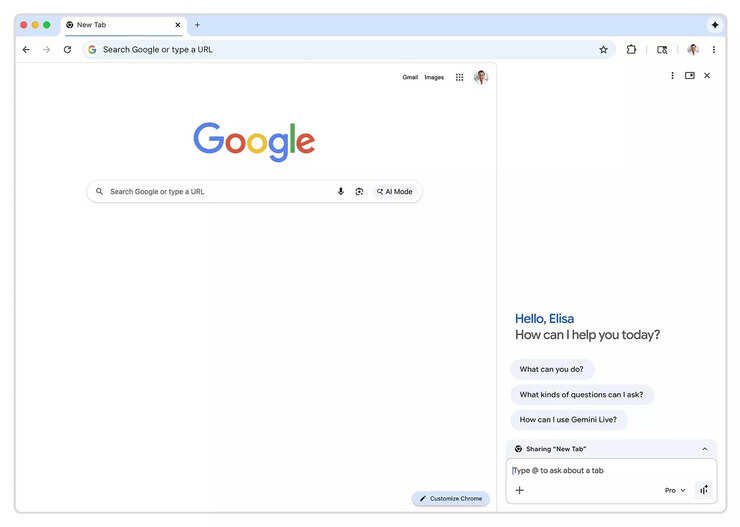
Google is reshaping the way we browse the web with a powerful update to Chrome, driven by its latest AI, Gemini 3. This upgrade transforms the browser into a smart assistant that can multitask, speed up browsing, and handle complex online tasks effortlessly. With the new Gemini side panel, users can access AI suggestions and actions without leaving their page. Plus, the Nano Banana tool lets you edit images directly inside Chrome — no extra apps required.
✨ Gemini Side Panel: Master Tabs Like a Pro
#GeminiSidePanelHelpsYouSlayTabs — The side panel is available across all tabs, activated by clicking the Gemini icon in the top‑right corner. It allows you to keep your main work open while handling tasks in the panel, like comparing shopping options, summarising reviews, or syncing calendars — all through natural language prompts.
🎨 Nano Banana: Edit Images Without Leaving Chrome
#NanoBananaLetsYouRemixImagesInstantly — Chrome now includes Google’s Nano Banana image editor. Just type a prompt in the Gemini side panel when an image is open, and transform it instantly. No downloads, no uploads — just quick, seamless image editing.
🧠 Personal Intelligence: Chrome That Remembers You
#GeminiPersonalIntelligenceLearnsYourContext — Soon, Chrome will introduce personal intelligence, allowing Gemini to recall past interactions and offer tailored suggestions. Privacy remains in your control — users must opt in, and apps can be disconnected anytime. For example, if Gemini spots your child’s school term dates in Gmail, it can help align holiday planning with spring break.
⚡ Can Chrome Really Do All the Work?
#GeminiMakesMultitaskingEffortless — Early testers report using the Gemini side panel to compare shopping options, summarise reviews, and organise calendars without leaving their page. Chrome now integrates more deeply with Google apps like Gmail, Calendar, Maps, YouTube, Flights, and Shopping, pulling context to help plan trips, draft emails, or find quick answers.
Share
What's Your Reaction?
 Like
0
Like
0
 Dislike
0
Dislike
0
 Love
0
Love
0
 Funny
0
Funny
0
 Angry
0
Angry
0
 Sad
0
Sad
0
 Wow
0
Wow
0